$ inkvoke
Generate and edit images from the terminal with OpenAI's image models. One Go binary (v1.0.0) for a single prompt, a photo edit, a JSON batch - and machine-readable --json output for agents.
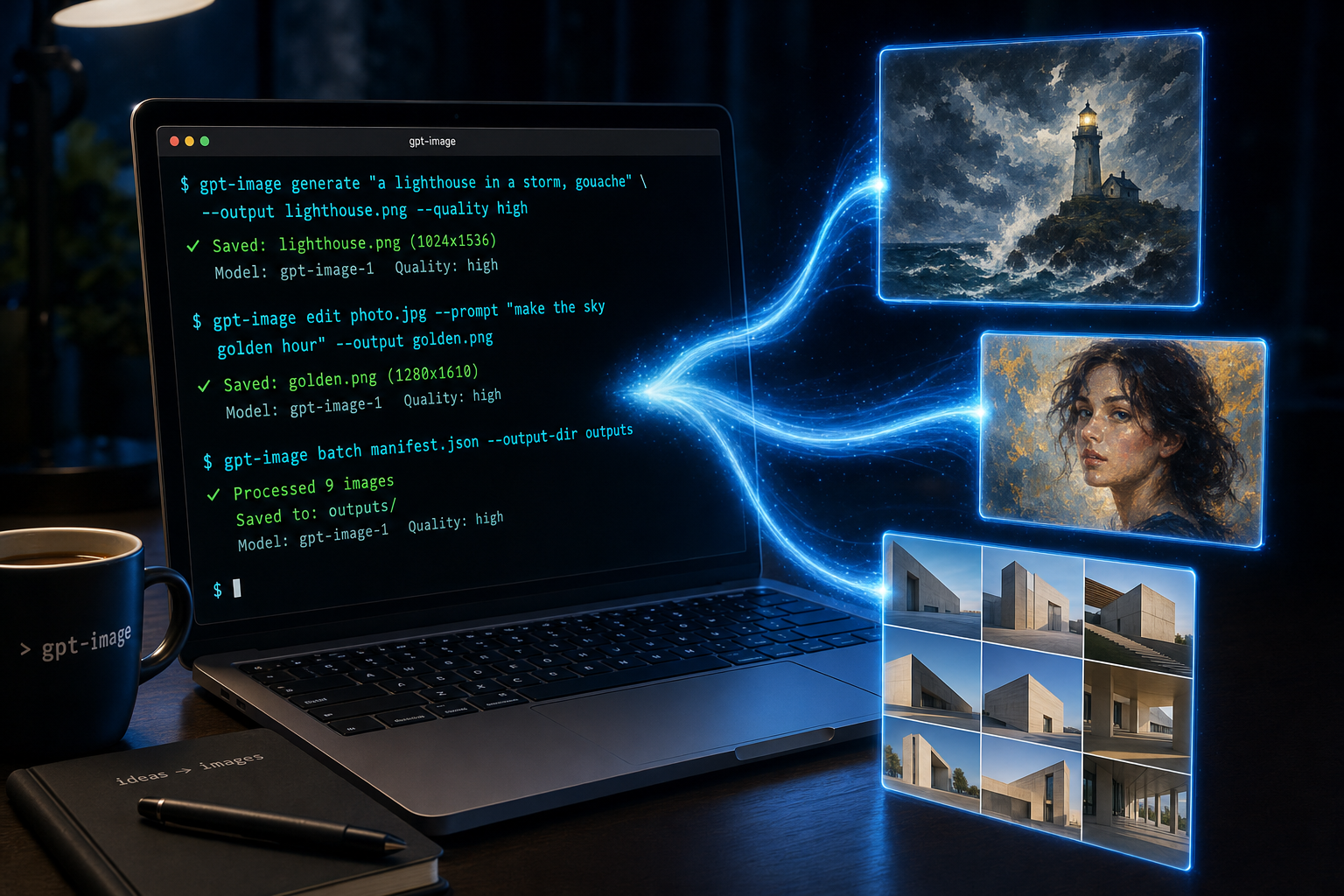
Illustration of the tool itself - terminal in, images out (generate, edit, batch). Also made with inkvoke generate (Go binary, v1.0.0). Click the image for the original Python-era product shot, then community samples.
$ inkvoke generate "a lighthouse in a storm, gouache" \
    --output lighthouse.png --quality high --size 1536x1024
Wrote lighthouse.png · ~$0.0531 est. · tokens in=18 out=1760 · 41s

$ inkvoke version
inkvoke 1.0.0 (default model: gpt-image-2)
Defaults to gpt-image-2. Started as a hair-color photo-edit workaround against Arena's image edit leaderboard; grew into a general Go CLI with agent-friendly --json and exit codes. The original hair-color path is inkvoke hair-color.
Try it live
Type or paste a multi-paragraph prompt the way you would in the CLI. Generating an image requires joining Jacob Stephens' blog newsletter (Cloudflare Turnstile; free trial limits apply).
Community gallery
Live-try generations plus sample outputs. Newest first (keeps the last 48; pinned samples stay). Prompt and optional display name only - no emails. Click a tile to enlarge. The same images cycle in the hero slideshow at the top of the page.
Running estimated OpenAI spend for public live-try images on this page (gpt-image-2 rates). Hiding an image removes its cost from this total; rotating old tiles out of the grid does not.
Loading gallery…
What it does
Three commands, one API key, no browser, no Python runtime. Download a single binary (or go install) and point it at OpenAI's image models. Humans get a cost line on stdout; agents pass --json and branch on exit codes. Keep inputs, outputs, and keys out of the repo.
Generate from a prompt
One string in, one PNG (or JPEG/WebP) out. Quality, size, and model are flags; defaults are gpt-image-2, quality auto, size auto.
Edit existing images
Pass one or more input paths and a prompt: golden-hour sky, recolor a door, or the original hair-color path. Same quality/size knobs as generate.
Batch from a JSON manifest
A list of prompts (optional edit_from, per-item quality/size/output). Concurrent workers, retries with backoff, --skip-existing.
Dry-run the plan
--dry-run prints what the batch would do without calling the API. Useful before a paid run of 30 items.
Machine-readable for agents
--json emits one result object on stdout (path, cost, tokens, errors). Exit codes 1–5 separate usage, auth, permanent API, retryable API, and I/O. See AGENTS.md or inkvoke --help-agent.
Key on disk or in env
OPENAI_API_KEY or --api-key-file ~/path/to/key.txt. The key never has to live inside the clone.
Code-only repo
.gitignore excludes image formats, inputs/, outputs/, local key files, and response JSON. Do not commit photos or keys.
Quickstart
Go binary - no Python, no venv, no pip. Current release: v1.0.0 (linux / macOS / Windows) — includes interactive multi-line paste (end prompt with ---), API-key prompt, and inkvoke --uninstall.
Binary (recommended)
Download the asset that matches both your OS and CPU. The wrong file (Linux on macOS, or amd64 on Apple Silicon) fails with exec format error or a wrong-architecture message. All downloads · SHA256SUMS included.
Which binary? (amd64 vs arm64)
| Suffix | CPU | Typical machines |
|---|---|---|
| amd64 | Intel/AMD 64-bit (x86_64) | Most Windows/Linux PCs; older Intel Macs |
| arm64 | ARM 64-bit (aarch64) | Apple Silicon Macs (M1–M4); many Pi / Graviton hosts |
- macOS Apple Silicon → inkvoke-darwin-arm64
- macOS Intel → inkvoke-darwin-amd64
- Linux x86_64 → inkvoke-linux-amd64
- Linux ARM64 → inkvoke-linux-arm64
- Windows x86_64 → inkvoke-windows-amd64.exe
Check if unsure: uname -s (Darwin = macOS, Linux = Linux) · uname -m (arm64/aarch64 → arm64; x86_64 → amd64).
macOS (Apple Silicon — arm64)
curl -fsSL -o inkvoke \
  https://github.com/JacobStephens2/inkvoke/releases/latest/download/inkvoke-darwin-arm64
chmod +x inkvoke
sudo mv inkvoke /usr/local/bin/inkvoke
inkvoke version
Expected: inkvoke 1.0.0 (default model: gpt-image-2) — do not paste this line; it is sample output.
macOS (Intel — amd64)
curl -fsSL -o inkvoke \
  https://github.com/JacobStephens2/inkvoke/releases/latest/download/inkvoke-darwin-amd64
chmod +x inkvoke
sudo mv inkvoke /usr/local/bin/inkvoke
inkvoke version
Linux (amd64)
curl -fsSL -o inkvoke \
  https://github.com/JacobStephens2/inkvoke/releases/latest/download/inkvoke-linux-amd64
chmod +x inkvoke
sudo mv inkvoke /usr/local/bin/inkvoke
inkvoke version
Expected: inkvoke 1.0.0 (default model: gpt-image-2) — do not paste this line; it is sample output.
Linux (arm64)
curl -fsSL -o inkvoke \
  https://github.com/JacobStephens2/inkvoke/releases/latest/download/inkvoke-linux-arm64
chmod +x inkvoke
sudo mv inkvoke /usr/local/bin/inkvoke
inkvoke version
Windows (amd64)
Download inkvoke-windows-amd64.exe, rename to inkvoke.exe if you like, put it on your PATH, then run inkvoke version.
Uninstall
inkvoke --uninstall
# if root-owned (e.g. /usr/local/bin):
sudo inkvoke --uninstall
Removes the inkvoke binary you just ran (not API keys or images). Then open a new terminal or run hash -r. Manual fallback: sudo rm /usr/local/bin/inkvoke.
With Go 1.22+
go install github.com/JacobStephens2/inkvoke/cmd/inkvoke@v1.0.0
Or from a clone: go build -o inkvoke ./cmd/inkvoke (go install puts the binary in $(go env GOPATH)/bin - put that on your PATH).
API key (required)
Every generate, edit, and batch call needs an OpenAI API key with access to image models. Create one in the OpenAI dashboard, then either export it in your shell or pass a file outside the repo. Without a key the CLI exits with missing API key.
export OPENAI_API_KEY="<your_openai_api_key>"
# or: inkvoke generate "…" --api-key-file ~/path/to/key.txt
Prefer a file on disk if you do not want the key in shell history. Long high-quality runs print stderr heartbeats; see --timeout / --quiet. Agents: read AGENTS.md or run inkvoke --help-agent.
Usage
Generate, edit, or batch. Pass --json when a machine must parse the result. Full flags and defaults live in the README; the agent contract is AGENTS.md.
Generate
inkvoke generate "a lighthouse in a storm, gouache" \
  --output lighthouse.png --quality high --size 1536x1024
Generate with --json (agents)
inkvoke generate "a lighthouse in a storm, gouache" \
  --output lighthouse.jpg --size 1280x648 --output-format jpeg \
  --quality high --json
Stdout is one JSON object (path, bytes, cost, tokens). Heartbeats stay on stderr. Prefer this over regexing the human cost line. Full contract: AGENTS.md.
Edit
inkvoke edit photo.jpg --prompt "make the sky golden hour" --output golden.png
Batch
inkvoke batch manifest.json --output-dir outputs \
  --quality high --size 1536x1024 --workers 3 --skip-existing
Manifest format
JSON list (or an object with an "images" list). Each item needs a prompt; everything else is optional.
[
  {"id": "cover", "prompt": "a stone house on a sea cliff at dawn"},
  {"id": "recolor", "prompt": "make the door red", "edit_from": "inputs/house.png",
   "quality": "medium", "size": "1024x1024", "output": "outputs/red-door.png"}
]
id names the output file when output is unset. edit_from (path or list) switches that item to edit. Failed items retry twice with backoff; the process exits non-zero if any still fail (see exit codes 1–5 under Features).
Hair-color path
The original Arena hair-color workflow is a first-class subcommand (same API edit under the hood).
inkvoke hair-color photo.jpg --output edited.png --color "strawberry blonde"